 OrcStrator

Key takeaways
- You do not need to code to use Claude Code, but you do need a paid Claude plan.
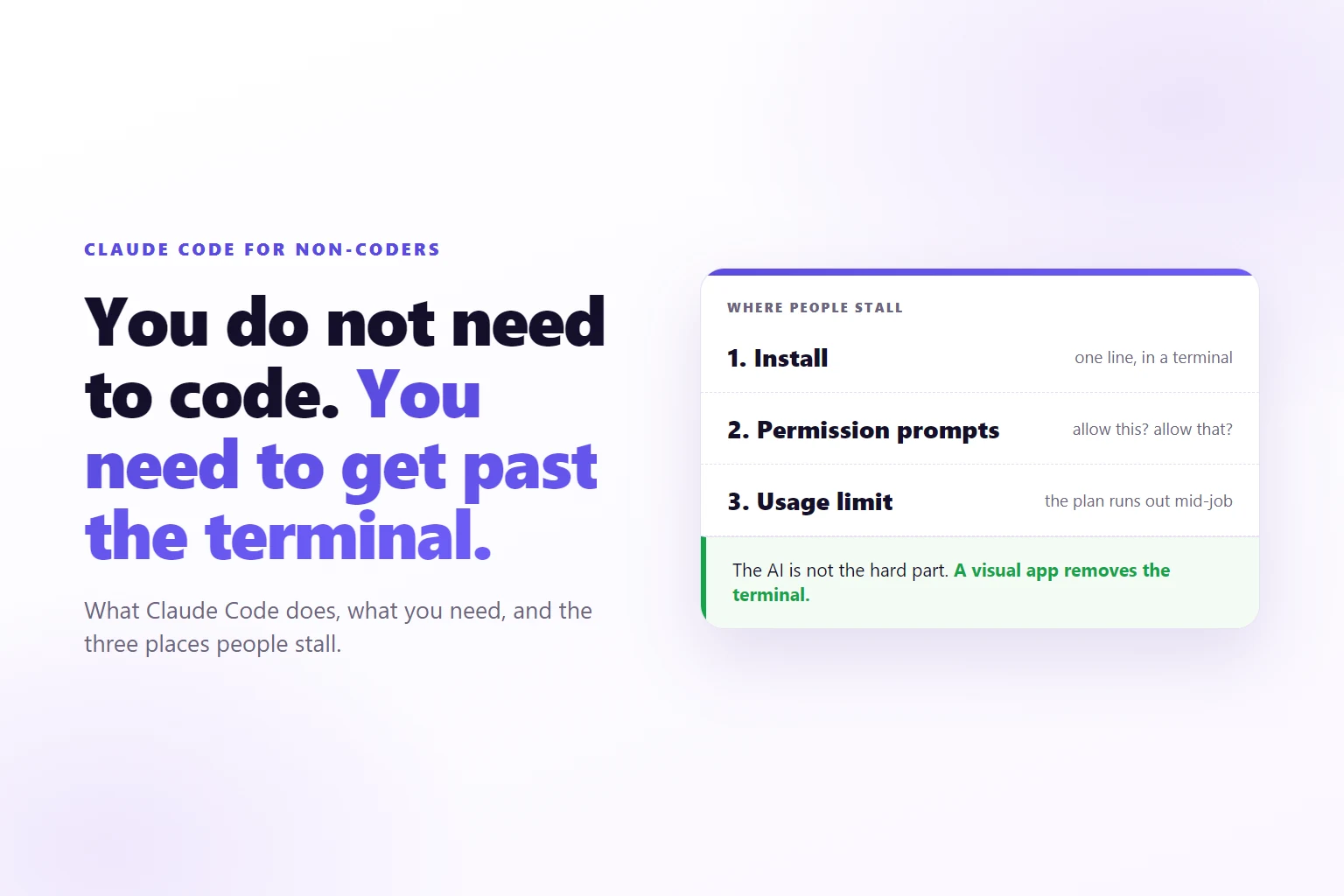
- The hard part for a non-coder is the terminal, the permission prompts and the limit, not the AI.
- Claude Code can edit files, build pages, draft documents and repeat jobs on a schedule, all from plain-word requests.
- A visual app on top removes the terminal and keeps the same Claude Code underneath.
Claude Code is Anthropic’s AI agent that works on files and tasks on your computer. For non-coders it is a way to hand over real work in plain words, if something sits between you and the terminal.
You heard that an AI can now do the boring parts of your job. You paid for Claude, opened Claude Code, and met a black window with a blinking cursor and no hint of what to type. Most people close it there and go back to the chat app.
That reaction is reasonable, and it is also a misreading. The window is not the AI. It is the doorway, and it was built for people who already live in doorways like it. This page explains what is behind it, what you need, where people stall and how to get through without learning to code.
What is Claude Code, in plain words?
Claude Code is an AI agent made by Anthropic. An agent is an AI that does not stop at an answer: it takes steps. It reads your files, changes them, runs things and keeps going until the job is done or it needs you. Anthropic’s own Claude Code overview describes it as a tool that reads your codebase, edits files and runs commands.
The word “codebase” is the first clue it was built for developers, and most of its documentation is written for them. The engine underneath is not picky, though. Anthropic’s common workflows page says Claude Code works in any folder, and names a notes vault and any collection of markdown files next to code. A folder of web pages, price lists or meeting notes is a folder.
The difference from the Claude chat app is the part that matters. In a chat, you ask and it answers, and you carry the answer to wherever it belongs. With Claude Code you ask for the change and the change is made, in the folder you pointed it at.
Do you need to know how to code to use it?
No. You write what you want in plain words and read the result in plain words. “Change the opening hours on the contact page to 7am to 3pm” is a complete instruction. Claude Code finds the right file, makes the edit and tells you what it did.
What you do need is a paid Claude plan. Anthropic’s support page on using Claude Code with a Claude plan says the individual plans include Claude Code on the same login as Claude. The other route is API credits, billed by use. The page also warns that if an API key is set on your computer, Claude Code uses it instead of your subscription, which is how people end up with a surprise bill.
So the entry ticket is a login you probably already have. The work that is left is practical, and that is where the next sections go.
What can a non-coder actually hand over?
Anything that lives in files on your computer and can be described in a sentence. A few jobs that fit, taken from the kind of day a small business has:
- Edit a page on your website: a headline, a photo, the opening hours, a form that stopped sending.
- Draft documents from material you already have: a proposal from last month’s one, a newsletter from three notes, captions for next week.
- Tidy things: rename a folder of files, compress images, sort exports into folders.
- Turn raw material into something usable: meeting notes into a list of tasks, a recording into a written summary.
- Repeat something on a schedule: a weekly report every Monday at 9.
Claude Code also connects to other tools. Anthropic’s overview lists it reading design documents in Google Drive, updating tickets and pulling data from Slack, through a standard called MCP. You do not need to understand the standard. You need to know the option exists when your work lives in more than files.
If your work is marketing or you run the business yourself, Claude Code for marketers and Claude Code for business owners show what these jobs look like in each role. What it does not do well is anything you cannot check. If you cannot tell whether a result is right, the job is too big for a first try. More on that in the first-week section.
What you need before the first message
Four things, all ordinary.
- A Windows computer that stays on. Claude Code runs on your machine, so the machine has to be awake while it works. OrcStrator runs on Windows 10 and 11 only, and this page assumes Windows.
- A paid Claude plan. Anthropic’s setup page lists Pro, Max, Ultra, Team, Enterprise or a Console account. Not the free chat tier.
- Claude Code itself. Anthropic’s install is a line of text you paste into a terminal. Anthropic also recommends Git for Windows, a free tool for tracking changes to files, so Claude Code can use its Bash tool. If you skip it, Claude Code falls back to PowerShell, the blue terminal that comes with Windows.
- A folder to work in. Claude Code works in the folder you give it. Pick one with a copy of the thing you want changed, not the only copy.
Notice that three of the four are about your computer, not about AI. That is the pattern in the next section.
Where non-coders get stuck
Three places, in the same order every time: install, permission prompts and the usage limit.
Install. The install is one pasted line, but the line goes into a terminal, and the terminal has two flavours on Windows that look alike and accept different commands. Anthropic’s overview warns about exactly this: a message about a “token” that is “not a valid statement separator” means you are in PowerShell when the command was written for CMD, and the reverse. A new terminal window is needed afterwards, and if Windows says claude is not recognised, the install location is missing from something called PATH. None of this is hard. All of it is unexplained.
Permission prompts. Claude Code asks before it acts. Anthropic’s permissions page says that in its default manual mode, file edits and shell commands need your approval, while reading files inside the working folder does not. That is the right design, and it is also a wall of questions like “Allow this command?” written for developers. A non-coder who cannot judge the command either approves everything or stops answering.
The usage limit. Anthropic’s support page says Claude chat and Claude Code draw from the same usage limits, with a five-hour session limit and a weekly limit on Pro and Max. A long job can use a lot. When the limit is reached the work stops until it resets, or until you add credits. The figures change, so this page gives none. How the usage limit works has the mechanism, and Anthropic’s pages have the numbers.
None of the three has anything to do with how smart the AI is. They are about the doorway.
Why the terminal is the real barrier
A terminal is a window where you type commands instead of clicking. It shows a prompt and waits. It does not list what you can do, it does not say what a command will change, and a typo gets a cryptic reply or none.
Developers like that, because for them it is fast. For you it removes every cue you rely on: no menus, no buttons, no preview, no undo you can see. The risk is real too. When the screen gives you nothing to go on, “Allow” is a guess.
This is why advice like “open the terminal and ask Claude” tends to fail for the people it is aimed at. The advice is correct and the experience is still hostile. The fix is not to try harder. It is to change what you look at.
Anthropic does ship other surfaces for Claude Code, and its overview lists a desktop app, a web version, IDE extensions and the terminal, all on the same engine. If you want to compare the options for Windows, choosing a Claude Code GUI on Windows goes through the kinds, and using Claude Code without a terminal covers the path step by step.
How a visual app removes the terminal
A visual app sits between you and Claude Code. It starts the real Claude Code in the background, on your own login, and shows what happens as chats, cards and buttons. OrcStrator is built that way: the homepage calls it the same Claude Code developers use, with buttons instead of commands, and says the official Claude Code is started silently in the background. Your keys stay on your PC, and your work goes from your computer to Claude on your own account.
Here is what changes at each of the three stalls.
Install. The OrcStrator installer sets up what it needs, Claude Code included, and how OrcStrator works walks through what comes after. You sign in to Claude inside the app. When you are signed out, typing /login in a chat opens a “Sign in to Claude” card, so nobody needs the terminal to do it.
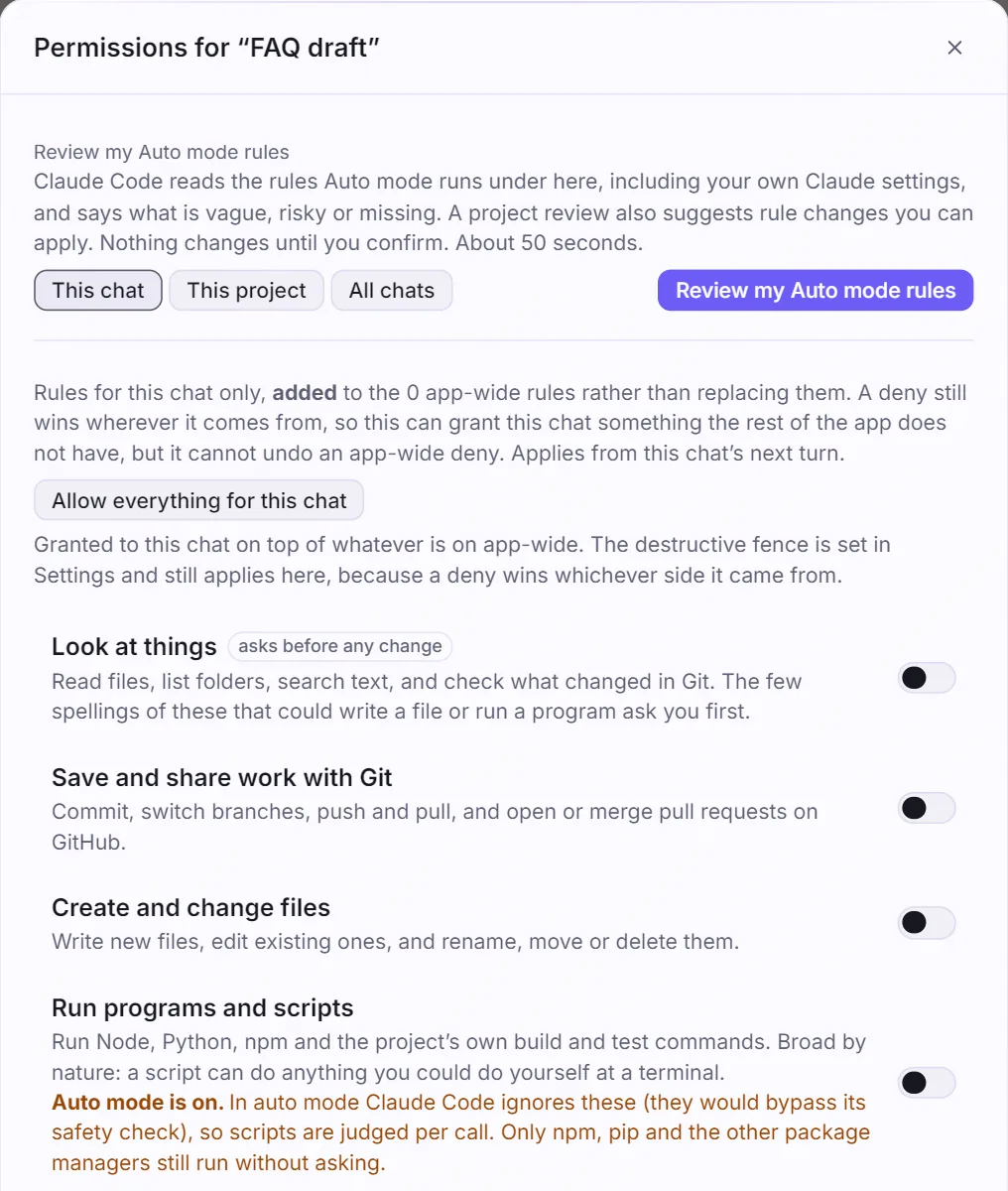
Permission prompts. A question arrives in words, on the chat or card that asked it. OrcStrator also counts the questions that keep coming back. When a harmless, read-only one has asked often enough, it offers to allow it for good, and the risky ones still ask. Anything that could write, delete or run a script is never suggested. You can see how that looks in the settings window below.
The usage limit. Your session and weekly limits sit on screen in the sidebar, and a line such as “Out of quota in 2h 13m” appears when you are on course to run out within six hours, before the limit resets. It shows nothing when it cannot tell, rather than guess. What the permission prompts mean and the limit page go deeper on each.
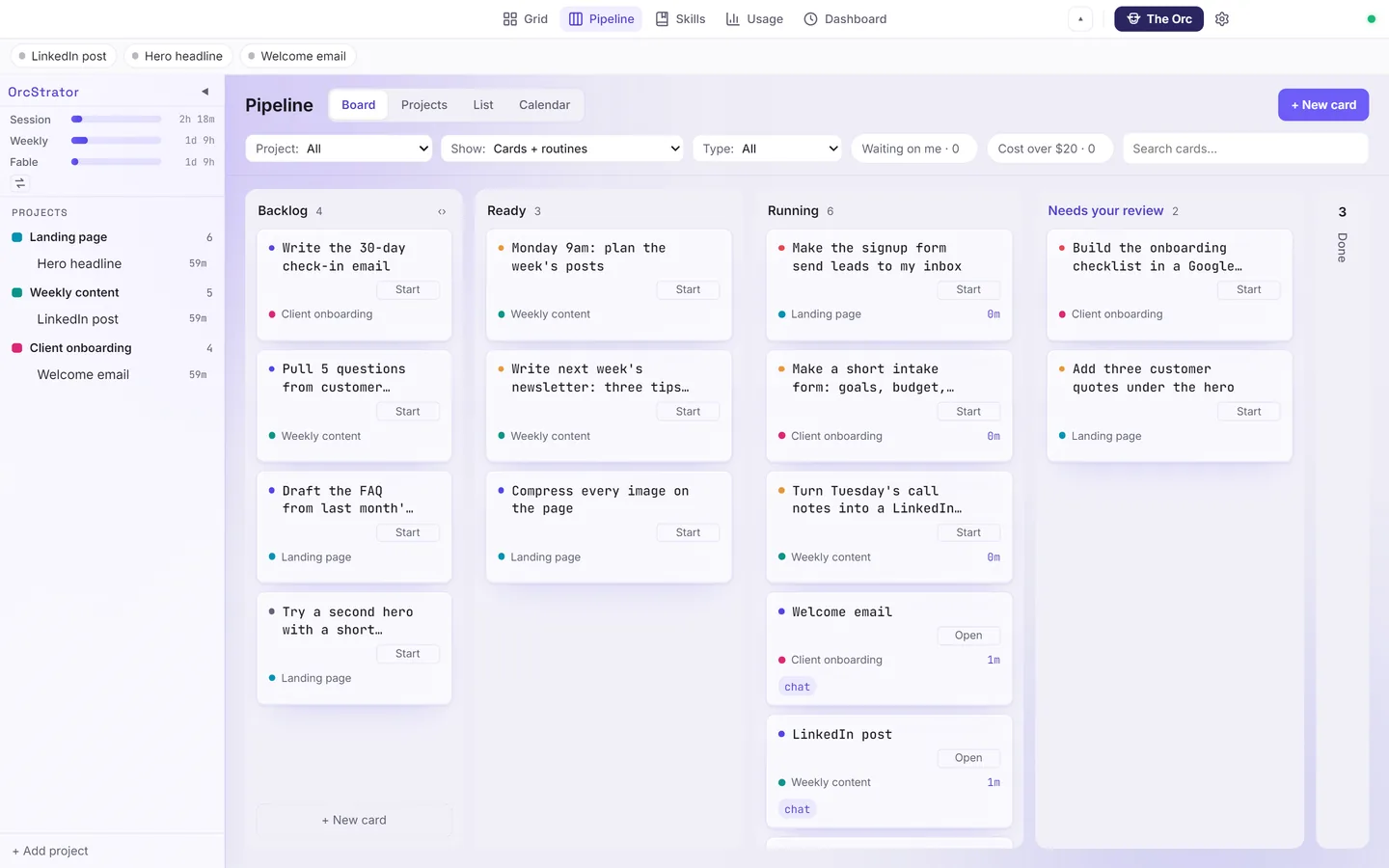
The rest. A job is a card on a board: Backlog, Ready, Running, Needs your review, Done. Several agents work at once, and the ones that need you turn amber and say why. Running several agents at once explains how they stay out of each other’s way, and what a non-coder’s board looks like shows it on real screens.
OrcStrator is a Windows app that uses Claude Code. It is not affiliated with Anthropic, and you still bring your own Claude plan.
What to do first in your first week
Start small and checkable. The first week is for building trust in what comes back, not for proving what it can do.
Day 1: one change you can see. Pick a page or a document you own, keep a copy, and ask for one change in one sentence: “Change the opening hours line to 7am to 3pm and nothing else.” Open the result and check it yourself. This teaches you how Claude Code reports, and how precise to be.
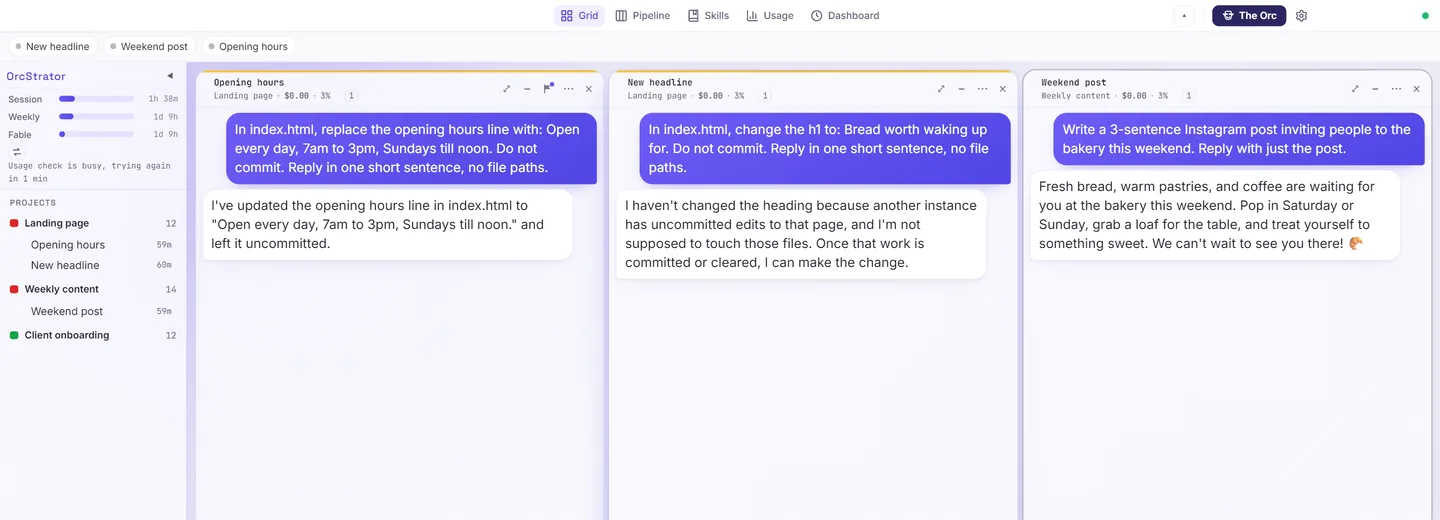
Day 2: a draft. Ask for something you would have written anyway, from material you give it: three notes into a newsletter, last month’s proposal into this month’s. You read it, you edit it. You are the editor.
Day 3: tidy a folder. Renaming files, sorting exports, compressing images. These are jobs where a mistake is visible at once and a backup copy fixes it.
Day 4: two jobs at once. This is where a board earns its place. Start two cards on different things and watch both. By default chats share the project folder, so OrcStrator pauses a second chat that reaches for a file another chat is changing. A chat can also work on its own copy of the project, and Safe Close in its Close menu asks it to save its own work before it closes.
Day 5: one routine. Pick one thing you do every week, such as a Monday report, and put it on a schedule. In OrcStrator, on the top plan, a routine fires by itself on a day and time you pick, and every run shows on a calendar. Anthropic also offers scheduled tasks, in the cloud and on the desktop, which its overview describes. The thing to know is that OrcStrator routines run on your computer, so it has to be on.
Two habits carry the whole week. Keep a backup of anything you cannot recreate. And read what Claude Code says it did before you move on, because that sentence is the check.
When Claude Code is the wrong tool
Four cases where you should not reach for it.
- The answer is the product. A question, a rewrite of a paragraph, a second opinion. The chat app is faster and nothing needs to change on disk.
- You cannot check the result. If you could not tell a correct tax calculation from a wrong one, an agent that does it faster does not help you. Fix that first, or hand it to someone who can check.
- The only copy is the original. Work on a copy until you trust the process. Claude Code can change files, and a change is a change.
- You need your computer off. Claude Code and OrcStrator both work on your machine. If a job has to run while your computer is asleep, use a cloud option such as Anthropic’s cloud scheduled tasks, which its overview says keep running when your computer is off.
One more limit on the visual route: OrcStrator is Windows only.
Frequently Asked Questions
Can I use Claude Code if I have never written code?
Yes. You describe what you want in plain words and Claude Code does the technical part, then reports back in words. The obstacles are practical: installing it, answering permission questions, and watching your usage limit. A paid Claude plan is required: Pro, Max, Ultra, Team or Enterprise, per Anthropic’s setup page. Starting with small, checkable jobs such as a page edit or a document draft builds trust early.
Is Claude Code free?
Not on its own. Claude Code runs on a paid Claude subscription (Pro, Max, Ultra, Team or Enterprise) or on API credits. What you pay is Anthropic’s plan price, and the work counts against your plan’s usage limit, which resets on a schedule. Check Anthropic’s current plan page for the figures, because they change.
What is the difference between Claude Code and the Claude chat app?
The chat app talks. Claude Code acts: it reads and writes files in folders you choose, runs steps and keeps working through a task. That makes it more useful for real jobs and riskier if left unwatched, which is why permission prompts exist. The two share your plan’s usage limit.
Do I have to use a terminal?
Not with a visual app on top of it. Claude Code started as a terminal tool, a black window where you type, and many guides still assume it. Apps such as OrcStrator run the same official Claude Code in the background and give you chats, a board and buttons instead of commands.
Will it break my files?
It can change files, so the safeguards matter. Claude Code asks before risky actions, you choose which folders it may use, and OrcStrator pauses a second chat that reaches for a file another chat is changing. Keep a backup of anything you cannot recreate, and read what it proposes before approving.
Try Claude Code without the terminal
Read next: Install OrcStrator on Windows, Step by Step, Claude Code Without the Terminal on Windows and Claude Code for Business Owners Explained.
OrcStrator runs the real Claude Code on your own Claude plan and shows it as chats and a board. Free plan, no card, Windows 10 and 11.
Download OrcStrator