 OrcStrator
 is a Windows app that runs several Claude Code agents at once for people who do not code. Every chat is a card on a board, routines start cards on a schedule, and your Claude usage limits stay on screen, all on your own computer with your own Claude login.
Claude Code is Anthropic's AI agent: it reads your files, changes them and keeps going until the job is done. Out of the box it lives in a terminal, one window per job. OrcStrator puts the same program behind a screen of chats and cards, so you can run ten jobs, walk away and come back to a board that says which ones need you.
What happens from install to the first finished job?
Seven steps, in the order the app shows them.
- Install on Windows. The installer runs on Windows 10 and 11 without admin rights and brings everything it needs. If Claude Code is missing, it downloads Anthropic's official installer and checks its signature.
- Create your OrcStrator account. A "Sign in" or "Create account" page opens on first run. Your chats and work stay on your computer; only your email, a scrambled computer id and your plan leave it.
- Sign in to Claude. A "Sign in to Claude" card signs Claude Code in with your own Claude login. If you hold more than one Claude account, the account switcher keeps one active at a time.
- Add a project. "+ Add project" offers "Open a folder" or "Start a new project". A project is a folder; its chats and cards belong to it.
- Write a card and press Start. Say what you want in plain words. The card opens a chat of Claude Code in that project and moves to Running.
- Answer when a card needs you. A chat waiting on you shows "Needs you". A permission question comes with a plain-English line, a recommendation and Accept or Reject.
- Review and close. Finished work lands in "Needs your review". Safe Close saves the chat's work, merges it and tidies up before the chat closes.
What is a card, and what is a chat?
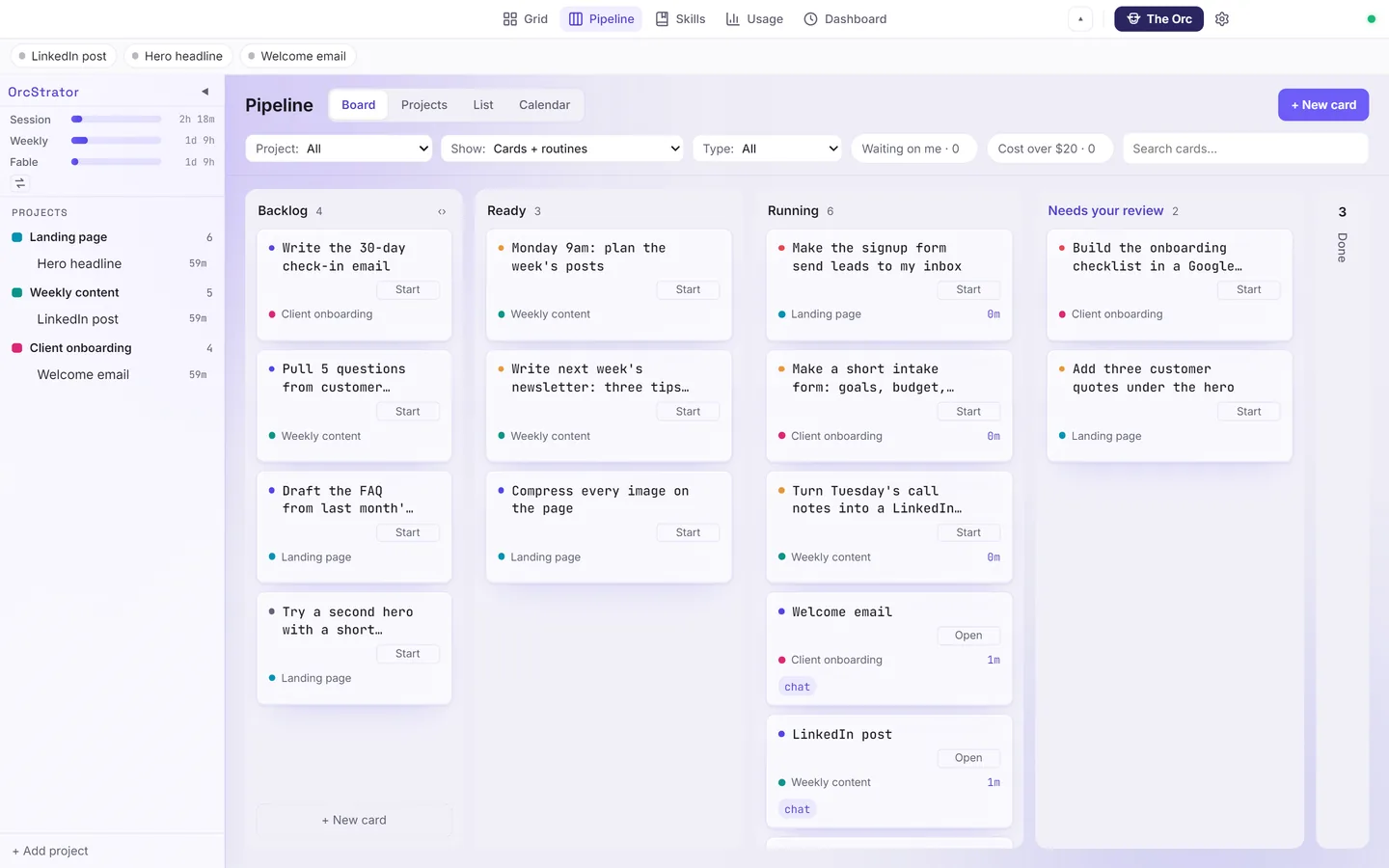
A chat is one Claude Code session doing one job. A card is that job on the board, with its status, settings and history. In OrcStrator every chat is a card from the moment you open it, a one-line question included, so nothing runs off the board.
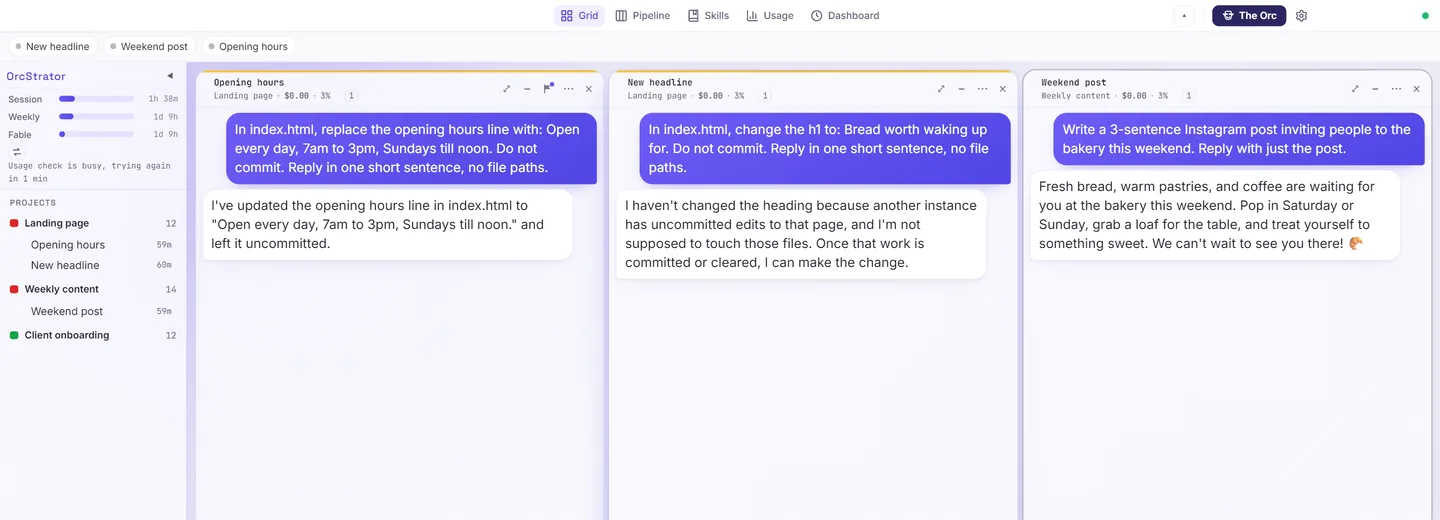
The board's columns are Backlog, Ready, Running, "Needs your review" and Done. The Tasks page adds "My Work" and "All tasks", with List, Board, Projects, Calendar and Timeline views. The chat grid holds up to 10 columns and 100 chats side by side.
How do routines run work on a schedule?
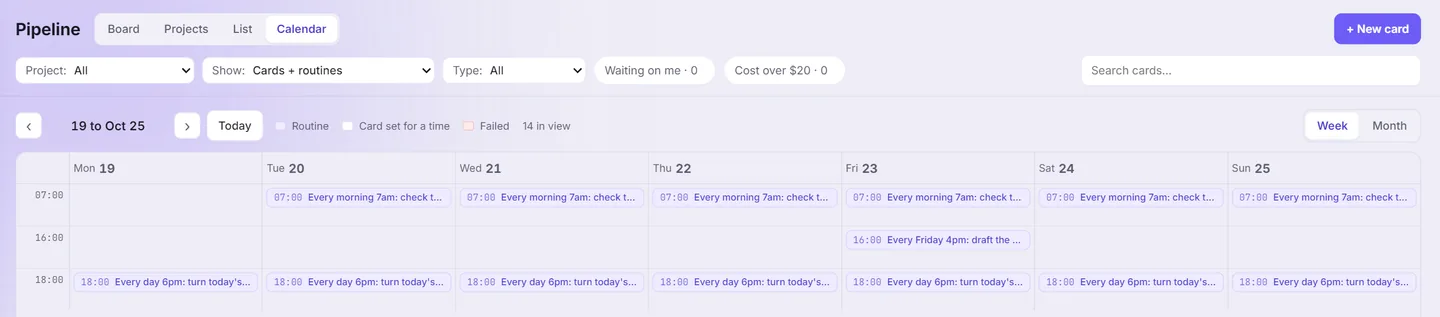
A routine is a card that starts itself. On any card, "When" offers "When I start it", "Once at" or "Repeating", and Repeating runs "Every" so many minutes or hours or "At set times". Each run opens a fresh chat in the project and leaves a record on the card.
Routines run on your computer: the app has to be open when a run is due. If it was closed, the most recent missed run goes ahead when you open it, as long as it is still recent. Routines and schedules are part of the paid plans, which are not on sale yet; see OrcStrator pricing for what the free plan covers today.
Why do chats work in side copies?
Two agents editing the same file at the same time is how work gets lost. Claude Code can move a chat into its own side copy of the project, a separate working copy that git calls a worktree, and OrcStrator keeps track of each chat's side copies and drafts.
When a chat is done, the Close menu offers "Safe Close", "Save work, keep open", "Send back to the board", "Minimize" and "Force Close". Safe Close commits the work, merges it into the main version one chat at a time and cleans up. Folders with files in them are moved aside and kept for 30 days, never deleted.
What are chiefs?
Chiefs look after your routines so you do not have to read every run. The standard chiefs are Sales, Content, Operations, Finance, Product and Coach. Each one owns a set of routines, watches a main number, fixes a broken run on its own (up to two automatic tries) and asks you with answer buttons only when it needs a decision. A weekly review brings proposals you can Approve, Reject, Postpone or Discuss.
Chiefs are in Beta, and the app says so in an orange banner.
What does The Orc do?
The Orc is an assistant that runs the board for you. Ask in plain words and it makes cards, starts them, answers questions about your routines and keeps a timeline of what it did. Its guards are on by default: it sends no messages outside the app, spends no money and does not deploy to production. The Orc is part of the top paid plan.
How does OrcStrator show your Claude limits?
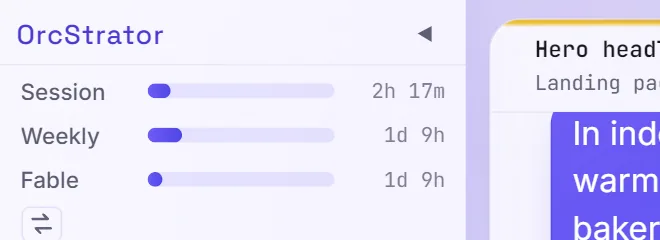
Session and weekly quota bars sit at the top of the sidebar, with a pace mark and a warning such as "Out of quota in 2d 5h" before you hit the wall. The Usage page splits what chats, The Orc and chiefs cost.
Three settings look after the limit for you. "Auto Compact" summarizes an idle chat before Claude's one-hour cache runs out, and shows what it saved. "Keep chats warm for an hour" keeps a quiet chat fast to resume. Helpers a chat starts run on a cheaper model by default. None of this adds quota: OrcStrator stays inside Anthropic's terms, and each Claude account keeps its own limits.
Can I run it from my phone?
Yes, with "Chat from your phone". You create a Telegram bot (Telegram is free) in five steps, and permission alerts you have not answered reach your phone after about 20 seconds, with Accept and Reject buttons. Voice notes and photos work. Your computer has to be on with OrcStrator open, because the phone talks to the app, not to a server.
What changed in the latest release?
The newest production release is version 2.2.5: OrcStrator 2.2.5: Backup and Restore Arrive. Every release since 2.2.2 is on the OrcStrator news page.
Frequently Asked Questions
Do I need to know how to code to use OrcStrator?
No. You type what you want in plain words, press Start and read the answer in plain words. Permission questions come with a plain-English line and a recommendation, and Safe Close saves a chat's work for you. OrcStrator runs the real Claude Code underneath, so the work is the same as in a terminal, without the terminal.
Does OrcStrator use my own Claude account?
Yes. Each chat starts the official Claude Code program on your computer, signed in with your own Claude login. Messages go from your computer to Anthropic with no proxy and no shared key, and OrcStrator never resells or pools Claude usage. You pay Anthropic for Claude; OrcStrator plans pay only for OrcStrator's own features.
Do routines run when my computer is off?
No. Routines run on your computer, so OrcStrator has to be open and the computer on when a run is due. If the app was closed at that time, the most recent missed run goes ahead when you open it again, as long as it is still recent. Chat from your phone works the same way: the phone talks to the app on your computer.
Can two chats break each other's work?
Each chat that changes files can work in its own side copy of the project, a separate working copy that git calls a worktree. Two chats then never write over the same files. When a chat is done, Safe Close saves its work, merges it into the main version one chat at a time and tidies up what the chat left behind.
Does OrcStrator work on Mac or Linux?
No. OrcStrator is a Windows app for Windows 10 and Windows 11 on 64-bit computers, and it installs without admin rights. If Claude Code is not on the computer yet, the installer downloads Anthropic's own installer for it and checks its signature before running it, so there is nothing to set up in a terminal.
Start with the free plan
OrcStrator's free plan covers chats, the board, side copies, Safe Close and your limits on screen. It runs on Windows 10 and 11 with your own Claude login.
Download OrcStrator